


- Part 1: How to Document your PowerShell Library
- Part 2: Using C# to Create PowerShell Cmdlets: The Basics
- Part 3: Documenting Your PowerShell Binary Cmdlets
- Part 4: Unified Approach to Generating Documentation for PowerShell Cmdlets
PowerShell’s Get-Help cmdlet is the conduit for getting details of a cmdlet, whether that cmdlet is written in C# or in PowerShell. Thus, one needs to be able to provide content for that help when writing in either language. From its early days, PowerShell has provided full support for documentation comments (“doc-comments”) in PowerShell code: you could instrument your functions with doc-comments and Get-Help would use those to generate its help. Until recently though, this has been rather arduous to do in C# code. Essentially, you had to perform a laborious and error-prone process to build your own MAML documentation file: Even with custom editors built for the task, it was a chore to keep your documentation in sync with your code.
Then in 2015, XmlDoc2CmdletDoc came along and filled in the crucial gap: you can now instrument your C# cmdlet code just like any other C# code, and just like PowerShell code. Therefore, you can nowadays easily support Get-Help from either C# or PowerShell and keep your documentation maintained right alongside your code.
That much allows you to feed proper details to Get-Help to show help for a single command. This follows in the venerable tradition of the Unix “man” command or the DOS “help” command, presenting documentation for a single command. Unlike those other environments, however, PowerShell is not just a shell language, but also a rich programming language. Therefore, PowerShell needs to be able to provide a navigable documentation tree such as is provided by Sandcastle for C# or by Javadoc for Java. To give you the same ease of use, you can use the DocTreeGenerator utility, which supports this key capability for PowerShell. It supports modules written in C# or in PowerShell, or in a combination of both.
The accompanying wallchart shows at a glance all the pieces you need to build your documentation using the above tools in concert with Visual Studio and PowerShell.
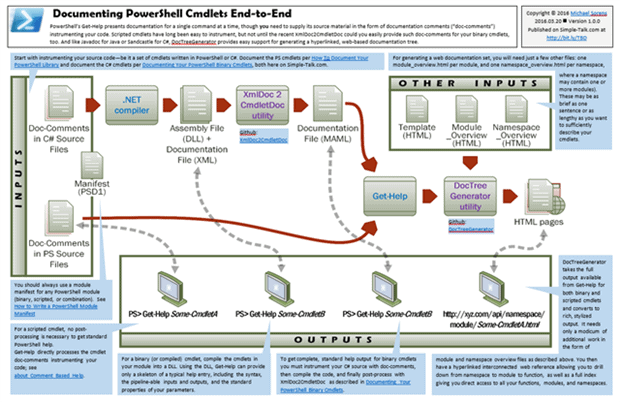
To download the full sized wallchart, either click on the thumbnail above, or click here.
This document contains proprietary information and is protected by copyright law.
Copyright © 2026 Red Gate Software Limited. All rights reserved

Load comments